Lighting · Two-light setup · Under $500
Your office already looks fine. It’s the light that gives it away.
Watch two videos shot in the same spare bedroom, one lit and one not, and the lit one doesn’t look like a nicer room. It looks like a different kind of video. That’s the whole trick, and it costs less than the camera you’re probably already pointing at yourself.
Free forever No credit card No watermarks
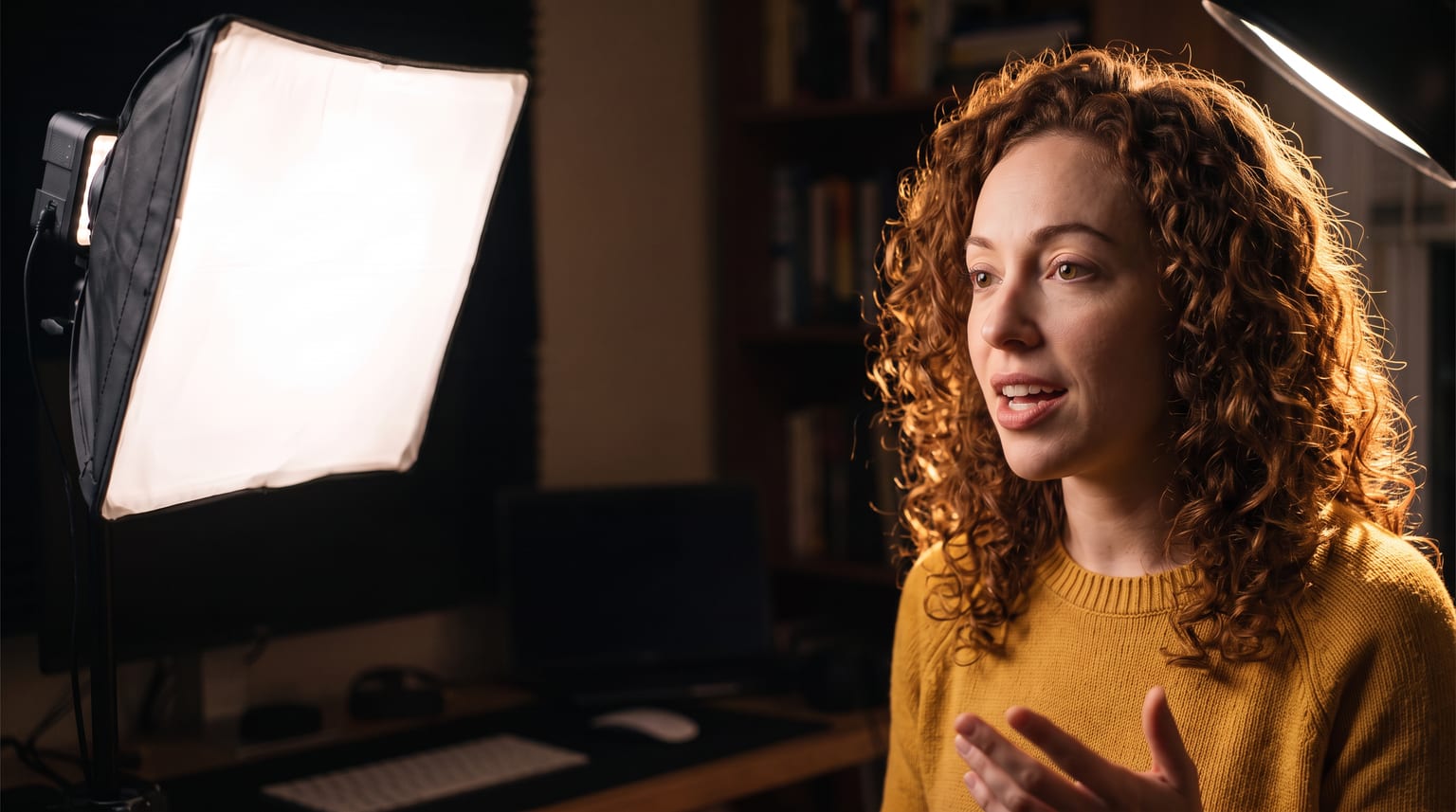
One soft key at 45 degrees, one light behind. That’s the whole setup.
Two lights is the number
A two-light talking-head setup needs a key light and a separation light. Put the key through a softbox at roughly 45 degrees off your nose and slightly above eye level, and put the second light behind you, aimed either at the wall or at the back of your head. Choose bi-color lights so you can match whatever your room and your windows are already doing.
One light gets you halfway and looks a bit flat or a bit harsh depending on where you put it. Three is a setup you’ll stop bothering with on a Tuesday. Two lights, left up permanently in the corner of an office, is the version you’ll actually use.
What to buy
Zhiyun’s MOLUS series is the cheap end of COB lights that don’t look cheap on camera. Prices from the Zhiyun US store on 8 September 2026. We don’t sell these and nobody paid us to mention them.
MOLUS X100 — $199
100W, 2700K-6500K, CRI 95+, TLCI 97+, 385g. The one to get: 3,881 lux at one meter, so it has the headroom to shoot through a softbox without running flat out. Both of your lights can be this.
MOLUS X60 — $129
60W, same color range and color accuracy, 313g. Same idea with less output - fine for a small room or as the second light. As of 8 September 2026 it was listed as pre-order rather than in stock, so the X100 is the one that ships today.
MOLUS G60 — $159
60W, CRI 96+, and it sits neatly between the other two on price - but Zhiyun’s Bowens adapter does not list it as compatible. Check with Zhiyun before buying this one for this build, because without the adapter you can’t hang a standard softbox on it.
The mount is the part people get wrong
The MOLUS lights use Zhiyun’s own ZY Mount, not the Bowens standard that most softboxes and lanterns are built for. So you also need the Bowens Mount Adapter B (ZY Mount to Bowens) at $39 each. That adapter is what lets you hang normal third-party modifiers off a MOLUS light, and its stated compatibility covers the X60, X100, their RGB versions, the CX50 and the CX100.
Mind the softbox limit, because it’s a real one rather than a suggestion: Zhiyun’s own instruction for the adapter is nothing larger than 60cm across and nothing heavier than 1.3kg. It’s about the adapter carrying the weight. A 60cm softbox, or a small lantern, is the ceiling. You’ll want two light stands as well, which come with nothing; any basic stand with a 1/4-inch thread works.
The build, roughly: two X100 at $199, two Bowens adapters at $39, one 60cm softbox, one lantern or second softbox, two stands. Call it $500 all in depending on which modifiers and stands you land on. Two X60 bodies instead drops about $140 off that.
Where to put them
This is the part that actually determines whether it looks hired.
Key light about 45 degrees off your nose
Camera-left or camera-right, softbox on it. Raise it so the bottom edge is a little above your eye line and tilt it down at you. You want the shadow under your nose pointing gently down and toward your cheek, not straight sideways and not straight down.
Get it close
Closer means softer, which is the single biggest difference between "lit" and "lamp pointed at a person". A 60cm softbox at arm’s length from your face is soft; the same softbox across the room is a hard light with extra steps. Turn the power down rather than pulling it back.
Second light behind you, not opposite you
The instinct is to put light two on the other side of your face as fill. In a small room you usually don’t need it, because the walls are already bouncing your key back at you. Put light two behind you instead - it has two jobs to choose from, and both separate you from the background.
Match the color temperature to the room
If there’s a window in shot, take both lights up toward 5600K. If it’s a lamp-lit evening office, come down toward 3200K. What looks wrong on camera is almost never the brightness, it’s two different colors of white in one frame.
Set the second light dimmer than the key
Meaningfully dimmer, roughly half or less. If you can’t tell which light is the key, neither can anyone watching, and it flattens out.
Then leave them there
The setup only pays off if standing up and recording takes no setup at all.
Option one: a hair light
The second light is where the same two-light kit produces two genuinely different looks, and the choice is worth making on purpose rather than by accident.
Raise the second light above and behind your head and tilt it steeply down at the back of your hair. Never point it toward the camera, or it flares your lens.
What you get is a bright edge running along the top and back of your hair and along the top of your shoulder. You separate from the background because there is light on you, outlining you. The room behind stays dark, which is exactly why this is the option for an ugly background. A cluttered shelf, a bare rental wall, a door you’d rather not explain: leave it in shadow and let the rim around your head do the work. It’s also the more forgiving option in a tight room, because it needs no particular distance behind you.
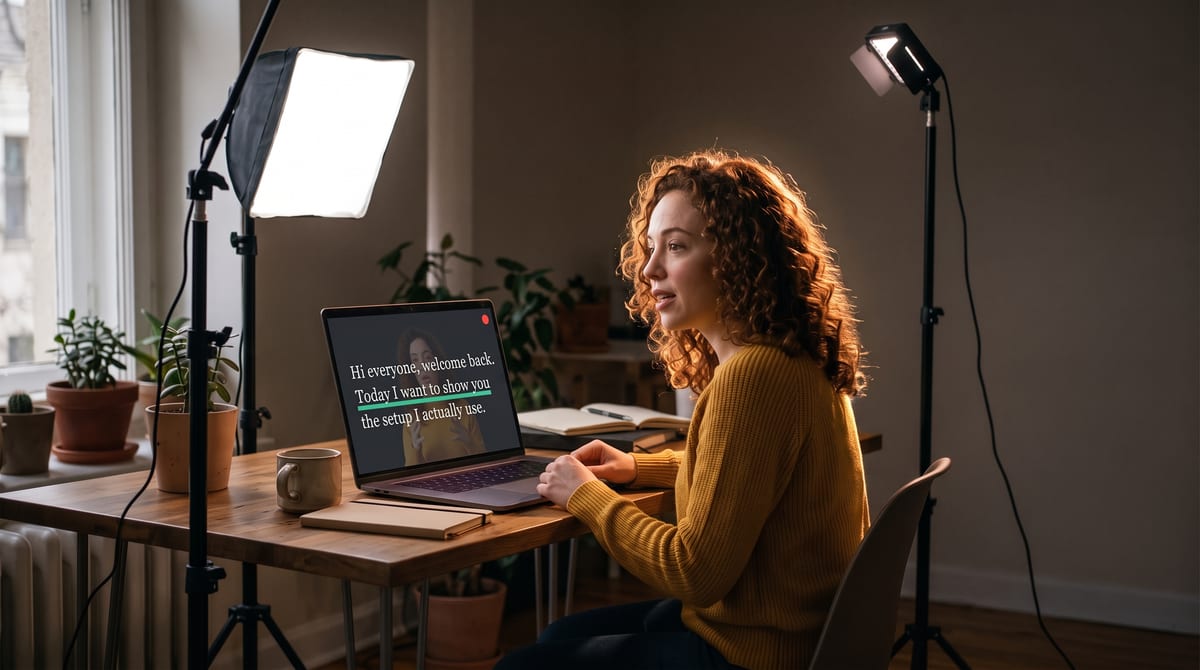
Light on you, not on the room. The background stays dark on purpose.
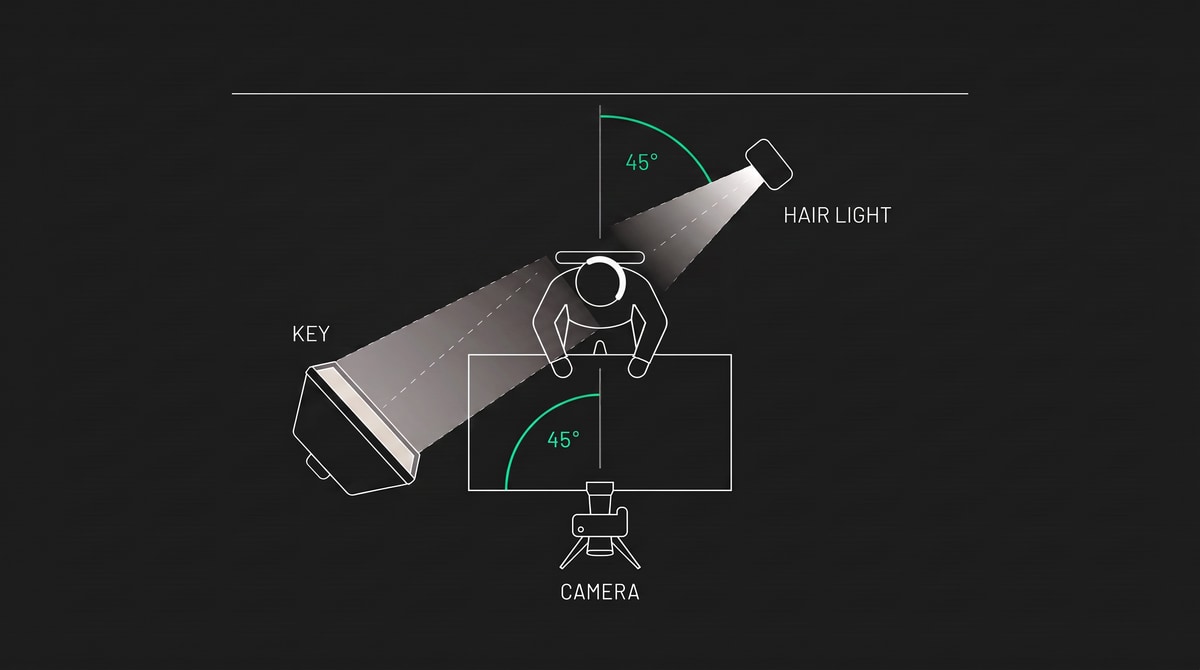
The hair light sits behind you and 45 degrees off the back of your head.
Option two: a background light
Put the second light low behind you, aimed away from you at the wall, and let it throw a soft oval pool of light on that wall directly behind your head.
Now the separation runs the other way. Your dark hair and shoulders read against a wall that is brighter than they are, and the whole frame stops looking flat. This is the option when the background is actually worth showing, or when the wall is plain enough that a gradient of light on it becomes the set decoration.
The one mistake worth naming. Point it at the wall the camera can see. It is genuinely easy to set a background light beautifully onto the wall beside your monitor, or the one behind your own chair, and then discover in the recording that nothing changed, because that wall was never in frame. Sit down, look at your own feed, and confirm the pool of light is landing inside the shot before you touch anything else.
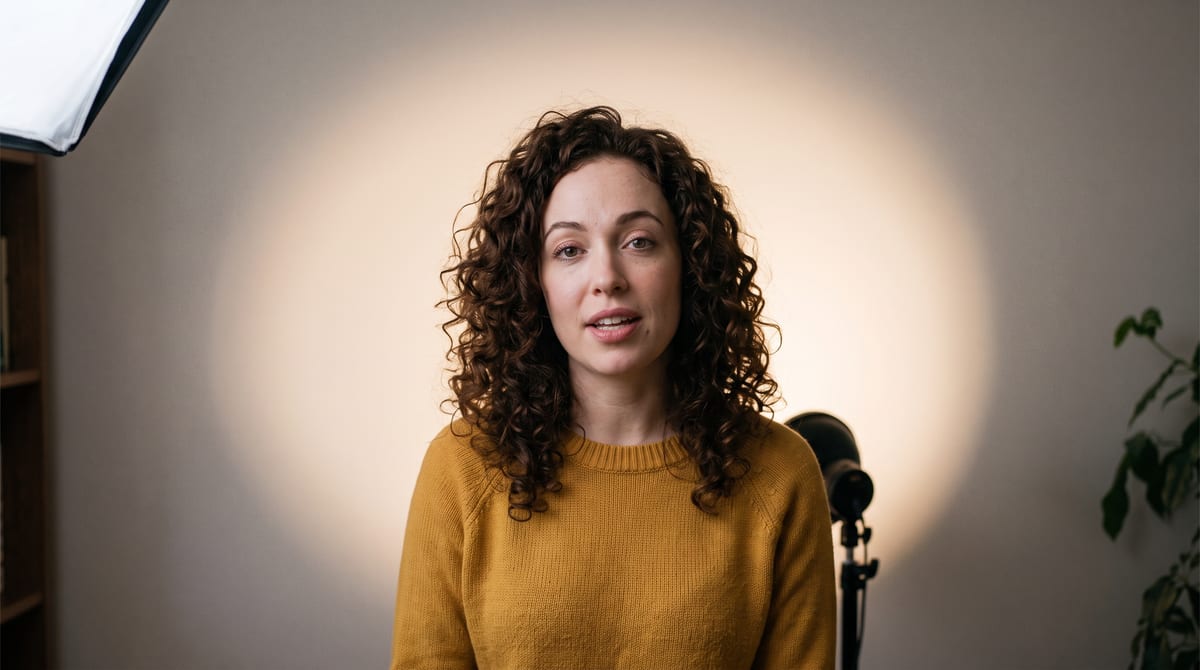
Shot from the camera position, so you can see what the camera sees.
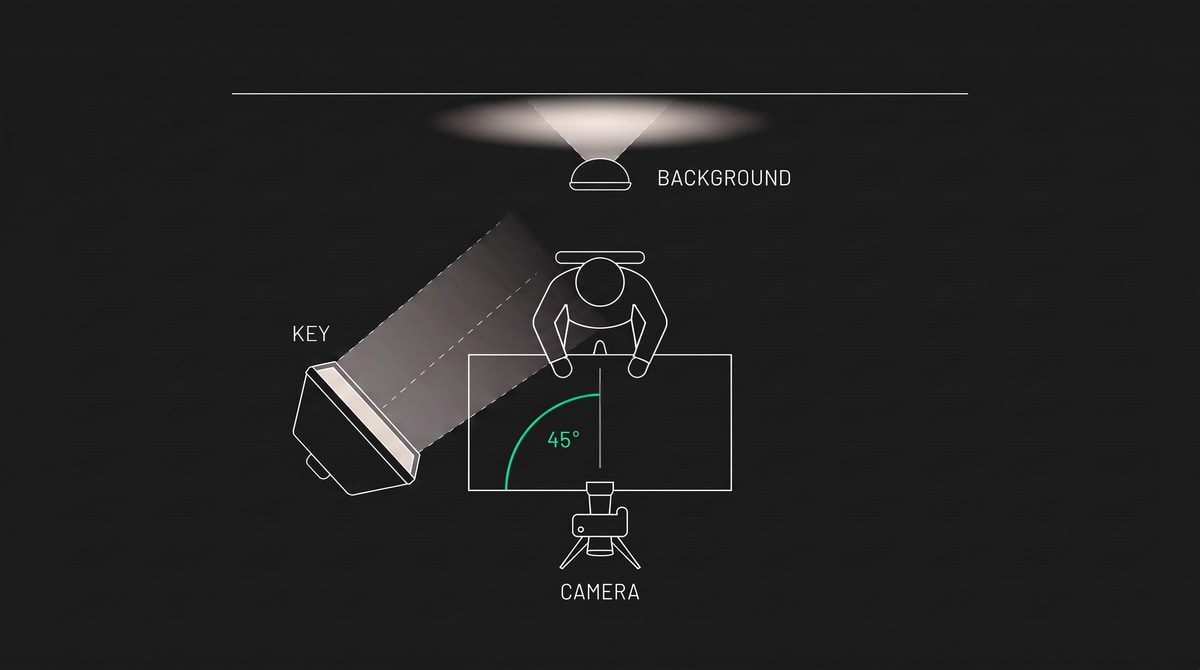
The background light sits between you and the wall, aimed away from you.
Or fill, if you’d rather
The same two lights do a fill setup too. Key at 45 degrees, second light on the opposite side at low power and further back, just lifting the shadow side. Softer, flatter, more corporate. Perfectly fine, and the right answer for some faces and some brands.
But separation is the one that makes a spare room stop looking like a spare room, so try the hair light first.
Check it on your own face, while you read
Here’s the part that’s easy to miss. You can’t judge your own lighting by looking at the lights. You judge it on the camera feed, and the feed is usually on a screen behind the camera where you can’t see it while you’re performing.
CameraPrompter puts your camera feed behind your script, which means your monitor is doing both jobs. Read a couple of lines of the actual script, watch your own face while you do it, and you’ll spot the things that only show up in motion. The hot spot on your forehead when you lean in. The shadow that swallows one eye when you turn to the left. The background light that’s clipping to white behind your shoulder.
Adjust, read the lines again, and stop when it looks right. It’s the same loop the pros run with a monitor, except you don’t need the monitor. It works with a laptop webcam and it works with the nice camera too, over USB or through a capture card, so what you’re seeing is exactly the frame you’re recording.
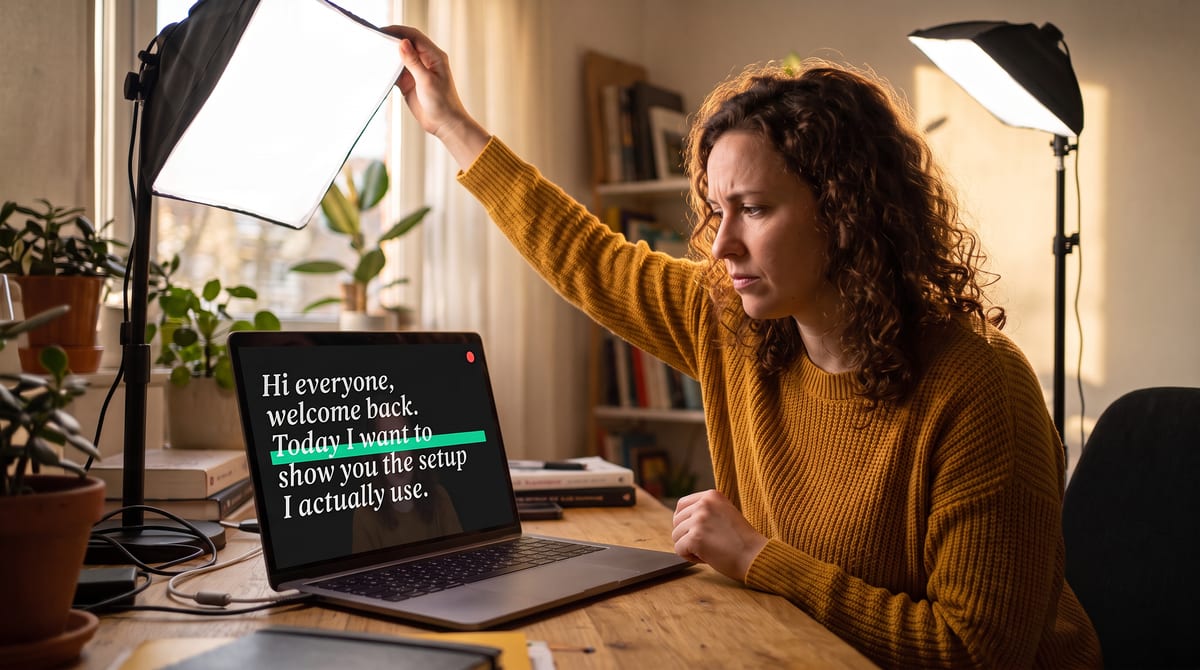
Adjust, read a line, look. The fastest lighting loop there is.
Frequently asked questions
What is a good two-light setup for filming in a home office?
A key light and a separation light. Put the key through a softbox at roughly 45 degrees off your nose and slightly above eye level, close enough that the light is soft. Put the second light behind you at about half the brightness, aimed either at the wall behind you or at the back of your head. Two Zhiyun MOLUS X100 lights, at $199 each as of September 2026, cover it, and both are bi-color from 2700K to 6500K so you can match your room.
Is 60W enough, or do I need 100W?
For one person in an office, 60W through a softbox is enough. The 100W is worth the extra $70 for headroom, because a light running at 40 percent runs cooler and quieter than one running flat out, and you’ll have the output if you ever move it further back or shoot in a brighter room.
Where should the second light go?
Behind you, at roughly half the brightness of your key, doing one of two jobs. As a hair light it goes above and behind your head, tilted down at the back of your hair, and outlines you while the background stays dark. As a background light it goes low behind you, aimed at the wall, and puts a soft pool of light on the wall so your darker hair and shoulders read against it. Pointing it at your face as fill also works, but gives a flatter look.
What’s the difference between a hair light and a background light?
Which surface the light lands on. A hair light lands on you, adding a bright rim along your hair and shoulders, and leaves the room behind you dark. A background light lands on the wall behind you, brightening it so your outline shows against it, and adds nothing to you directly. Both create separation. Choose the hair light when your background is cluttered or unattractive, and the background light when the wall is plain and worth turning into a soft gradient.
My background light doesn’t seem to do anything. What’s wrong?
Almost always that the wall it is lighting is not in the shot. A background light aimed at the wall beside your monitor, or behind your own chair, changes nothing on camera even though the room looks brighter to you. Watch your own camera feed while you aim it and confirm the pool of light is landing inside the frame you are recording.
Do I need a special adapter for softboxes?
Yes. Zhiyun MOLUS lights use Zhiyun’s own ZY Mount rather than the Bowens standard most softboxes are built for, so you need a Bowens Mount Adapter B at about $39 per light. Zhiyun’s instruction for that adapter is a softbox no larger than 60cm across and no heavier than 1.3kg, which is a weight limit on the adapter rather than a style preference.
Will the lights show up in my video?
Not if they’re outside the frame, which is why the crop matters. Set your framing first, then place lights just outside its edges. Reading a few lines while watching your own feed is the fastest way to confirm nothing has crept into shot.
Do these lights make noise?
Both the X100 and X60 use active cooling with fans, which Zhiyun describes as silent or ultra-silent. In a quiet room, a couple of feet from a sensitive microphone, treat any fan as something to test rather than trust. Run a test recording before you commit to a mic position.
Lights up, eyes on the lens.
CameraPrompter is free forever, with your face behind your words so you can see what the light is doing. 7 days of Pro free on signup.
Start Prompting FreeNo credit card. Setup takes about 60 seconds.